AI Assisted Reversing Tools & REvAId
Why existing Ghidra-MCP setups fall short for AI-assisted binary reverse engineering, and how I built REvAId to make reversing EDRs with AI agents faster, simpler, and verifiable.
Reversing Detection Technologies
Red Teaming is still not a precise science. It’s mostly trial and error of different hacking techniques, and distributed opinions and experiences on how to bypass EDRs.
The scene has made some improvements in analyzing EDRs to actually find out how they work. But using AI makes this way faster and easier.
How to use AI to improve reversing?
Based on AI Assisted Malware Analysis Tips, we need to perform the following tasks to enable AI-assisted reversing:
- Set up a contained lab
- Direct the agent
- Delegate the right task
- Verify the agent’s claims
- Question each conclusion
We focus here on 1 and 4, the actual reverse engineering tool setup. We want to give the AI agent the best possible tools to help its reversing effort—and do this for an arbitrary number of binaries.
The current way - Ghidra-MCP
It is preferable for LLMs to consume C code rather than ASM code, as LLMs are trained and used mostly on non-assembly code. So to reverse engineer a binary with AI, the most important step is to decompile it. Decompilation can use AI too, but that’s not relevant for us here. There are some powerful decompilers:
- Ghidra: Free and open source
- IDA: Paid and closed source
- Binary Ninja: Paid and closed source
- Kuna: Free and open source
Ghidra is the gold standard for decompilation. So how can an agent use it? The NSA doesn’t want to implement an MCP server, so we need to use one of the external projects:
- https://github.com/LaurieWired/GhidraMCP
- https://github.com/starsong-consulting/GhydraMCP
- https://github.com/bethington/ghidra-mcp
- https://github.com/cellebrite-labs/ghidra-rpc
- https://github.com/symgraph/GhidrAssistMCP
There are just a few problems:
- Ghidra runs on Java. I despise the ecosystem
- Ghidra is a GUI. It’s surprisingly cumbersome to use headless
- Because it’s a GUI, it only supports one binary at a time
- Large attack surface: Can’t give public access because of security
Alternatively, there are similar solutions for paid decompilers:
While working on this blog article, I also found clearbluejar pyghidra-mcp, which supports headless Ghidra and multiple binaries. But I would still not give untrusted users access to it.
Do we have a solution? Kuna. It’s based on Ghidra, but written in Rust. It has no GUI; it only emits decompilation. So while Ghidra is more of a reverse engineering framework, Kuna is a simple decompiler.
So while Kuna can produce decompilations, it does not have an MCP server to query it. So let’s build one. We can perform a JSON export of Kuna (or Ghidra, or any other decompiler!), ingest it into our middleware, and provide an MCP interface for an AI agent to query it. I call the middleware “REvAId” - REversing AId.
But - what data should we export from Kuna/Ghidra into the middleware?
Which leads to the question - what data does an AI agent need to successfully reverse engineer a binary?
Reversing tools
Useful tools, from ghidra mcp issue:
- get_binary_info - Get binary metadata (architecture, entry point, etc.)
- list_functions - List all functions with filtering
- decompile_function - Decompile function to C pseudocode
- get_strings - Extract string references
- get_xrefs - Analyze cross-references (to/from)
- disassemble - Disassemble instructions at address
- get_memory_blocks - Get memory section information
- get_symbols - Query symbol table
- search_strings - Search strings by pattern
- get_imports - List imported functions
- get_exports - List exported functions
That looks pretty good. But do we need all these tools? Especially get_memory_blocks, what
would an agent do with it? And what’s the actual difference between get_strings and get_symbols, and is it relevant for most usecases?
We see that even these high-level features still expose some PE internals. But do we need this? What if we try to provide an interface to the PE binary totally devoid of technical PE details, what tools would be available?
The entities:
- binary: Which binary it wants to analyze
- functions: Which functions are available in the binary
- data: What data is available in the binary
And the correlations:
- function callgraph: Which functions does a function call? (callees, and callers. Usually xrefs)
- data references: What data does a function use, and where else is it used? (strings, symbols)
We don’t need to know anything about PE sections or similar low-level things.
functions:
- address
- original name (typically something like
FUN_1234) - name (typically set by an LLM or agent)
- assembly instructions
- C code (from decompilation)
- callees
- callers
- referenced data
data:
- address
- data itself (string, bytes, …)
If we look at an actual example like pyghidra-mcp, it also offers (mostly) the same data as we can see in the command-line description:
# Decompile with callees, referenced strings, and cross-references
pyghidra-mcp-cli decompile --binary putty.exe main --callees --strings --xrefs
Middleware: REvAId
REvAId provides a database of functions and data of a PE file, with access to it provided by REST, SQL, and MCP.
It supports importing binary decompilation results from Ghidra and Kuna.
                    json    ┌──────────────┐     MCP
binary ───► ghidra  ─────►  │              │◄──────────── agent
                    json    │  REvAId      │     REST
binary ───► kuna    ─────►  │  Middleware  │◄──────────── Web-UI
                            │              │
                            └──────┬───────┘
                                   │
                             ┌─────▼──────┐
                             │    DB      │
                             │            │
                             │ functions  │
                             │ data       │
                             └────────────┘
So to export the data from Kuna, and import into REvAId:
$ ./kuna decompile-graph test.exe -o kuna.json
$ uv run graphrev import-export kuna.json --binary test.exe
Tools:
- Binary discovery: List available binaries and versions.
- Function analysis: Search functions by metadata or code, retrieve decompiled code, and inspect call relationships.
- Data analysis: Search strings, imports, bytes, and globals; inspect references; find functions connected through shared data.
- Knowledge capture: Save meaningful function names, summaries, and data-item descriptions for future analysis.
A typical workflow starts with list_binaries, locates relevant functions using find_functions_by_data or search_code, inspects them with get_function or decompile_many, and records findings with the update tools.
| Tool | High-level purpose |
|---|---|
list_binaries |
Lists available binaries, versions, and basic statistics. |
find_functions |
Finds functions by name, address, notes, summaries, or decompiled code. |
search_code |
Searches decompiled C and returns matching lines with context. |
decompile_many |
Retrieves decompiled C for several functions efficiently. |
get_function |
Retrieves one function with code, metadata, callers, and callees. |
get_functions |
Retrieves detailed information for multiple functions. |
set_function_info |
Saves an analyzed function name and summaries. |
search_data |
Searches indexed strings, imports, bytes, and other data items. |
get_data_item |
Retrieves a data item and the code locations referencing it. |
set_data_item_summary |
Saves or clears an AI-generated data-item summary. |
get_function_data |
Lists data items referenced by a function. |
find_functions_by_data |
Finds functions that reference matching data items. |
find_related_functions |
Finds related functions based on rare shared data references. |
LLM Summaries
It is expensive to analyze full binaries at once (in tokens). And once the AI is analyzing the source code, it can rename functions to what their possible original function name is. This makes it easier for the AI, and the user, to make sense out of the codebase. There is also a short summary (one line), and a long summary (several paragraphs) about what the function is doing.
Each function has the native fields:
- llm_function_name
- llm_summary_short
- llm_summary_long
This can either be done by:
- Feeding the decompiled C code to an LLM to summarize it
- Or letting an agent explore the binary via MCP
The latter gives better results as it can get more context if needed.
Verifying the Agent’s Claims
Using AI agents to autonomously reverse EDRs will result in
a large amount of documentation and hypotheses—which brings us back to point #4 from the introduction: verifying the agent’s claims.
Instead of blindly trusting an AI agent’s output completely, the REvAId Web-UI enables the reverser to verify its claims by providing a graphical interface with function summaries while still giving immediate access to the underlying raw information like decompiled code and data references.
For example, when doing graphical analysis of callgraphs in Windows Defender’s mpengine.dll, we can see how the agent renamed functions (such as check_process_hollowing at 0x180293358) and summarized how it uses VirtualQueryEx to scan executable memory regions for non-MEM_IMAGE backing and report the "Hollow1" detection string:
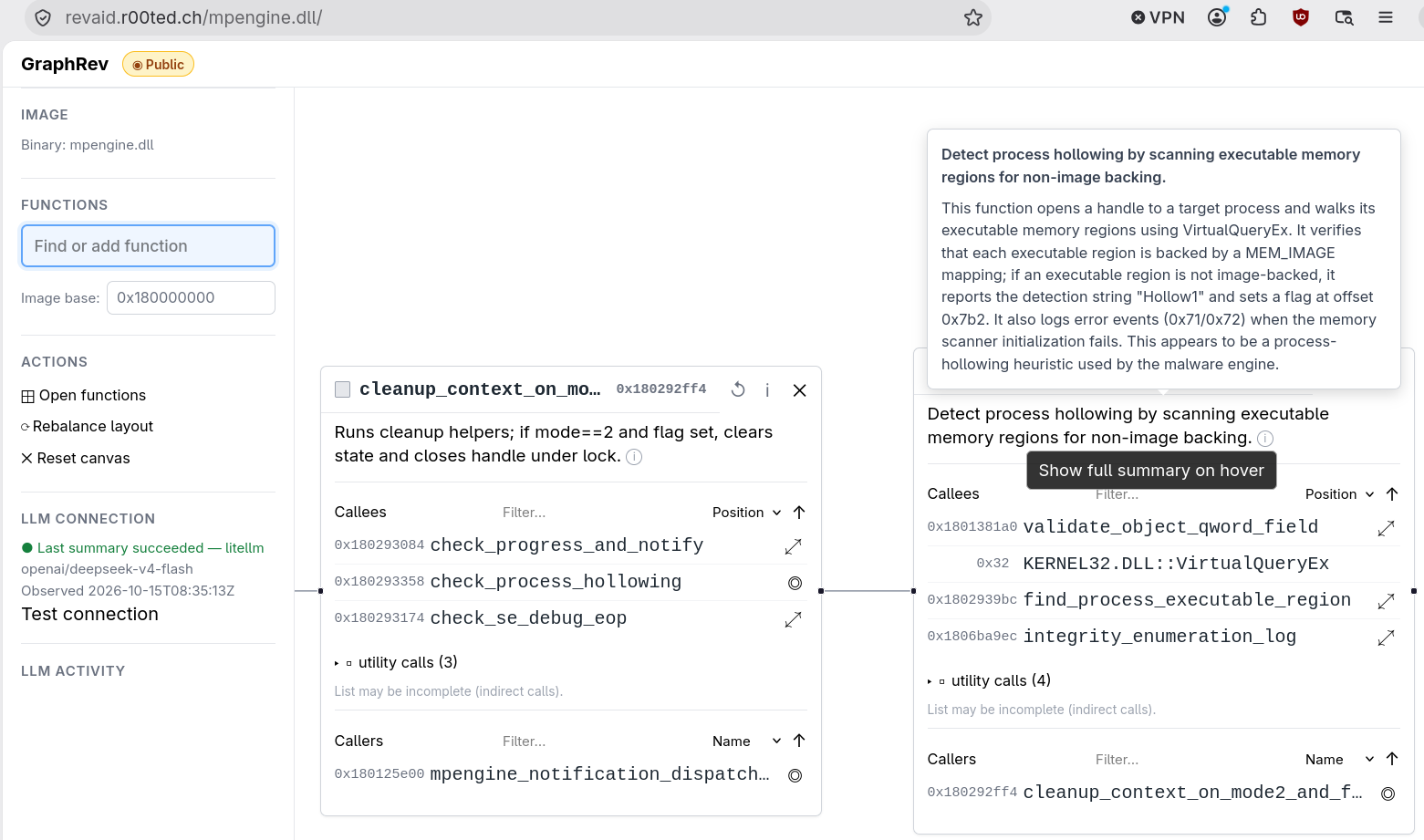
By browsing the callgraph with short summaries visible at a glance and hovering for detailed descriptions, we can quickly verify parts of the binary’s actual functionality against the decompiled C code.
Differences to existing Ghidra-MCPs
Compared to hooking an agent directly up to a live Ghidra instance via MCP, REvAId takes a different approach:
- Function-centric: Focus on functions and callgraphs, not basic blocks
- Decompiler-agnostic: Support different decompilation backends (Ghidra, Kuna) that parse code and data references once during export
- Unified data reference store: Combines strings, imports, and globals into a single queryable model
- Lightweight & portable: No direct access to the PE binary or live decompiler needed during analysis; results are stored in a portable SQLite DB
- Easy & safe to host: Way easier setup, and secure enough to be accessed publicly or shared with a team (e.g.,
revaid.r00ted.ch) since it only serves a database rather than exposing Ghidra RPC - First-class LLM function names and summaries: Persists AI-generated names and descriptions directly alongside the functions
The last point—capturing the agent’s knowledge directly in the database so both human reversers and future AI sessions can build on it—is the most essential and differentiating factor for me.